Failed to unregister < c:\Practpro\ImageLoader.dll> Exec result:- The system cannot find the file specified.'
Getting the errors below when launching or installing expd8 app.
Or
Check Windows features if .NET Framework 3.5 is uninstalled and just install this.
Select Download and install this feature.
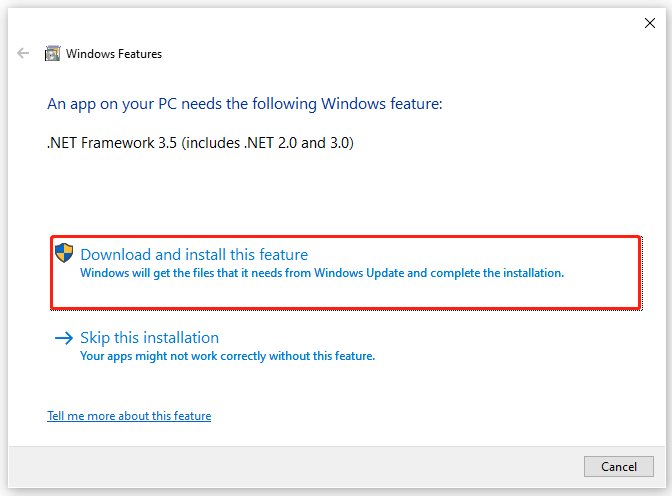
Then select Let Windows Update download the files for you.
Wait for the download to complete
Relaunch or re install expd8 app again and should be able to access it after.
Related Articles
File Stages eXpd8
Add File Stages to categories on Thread and update your case as it progresses. Adding File Stages 1. Click File on the top left corner of eXpd8. 2. Click Settings. 7 3. Go to the List Types tab. 4. Click Maintain file stages. 5. Select the category ...
File Management in eXpd8
Effectively carry out all of your file management on eXpd8, from adding files, linking main clients and contacts, creating activities such as tasks and phone messages, adding custom fields, creating templates, generating briefs, and more. Creating ...
Creating a new File
1. Select the Add File option within the Advanced search screen This will open the Summary tab screen for a new file 2. Enter a File Name 3. Owner will display the current users name, select alternative users from the drop down list (it is important ...
Maintaining File Stages
1. Click on Maintain File Stages to open the Maintain Stages screen. When created, stages are relevant and available to files within the associated category. 2. Below display lists all existing file categories: 3. Selecting a category, enables the ...
Failed to load control 'ImageList' from MSCOMCTL.OCX. Your version of MSCOMCTL.OCX may be outdated
Getting this error in Expd8 In most cases isn't OCX file rewritten by an older version, but the older version is placed in some directory by an incorrect setup program and registered in this new place. So it is sufficient to unregister & register ...